Showing posts with label DSDN101_PRO3. Show all posts

Monday, June 18, 2012

DSDN 101 Project 3: Final Video!


So, I finished it. Finally!!


I'm really pleased with the result. I was up way too damn late doing this project. People shouldn't be up at the times I was up. But ultimately I really enjoyed making the whole thing. It was a lot of work, but it was work I enjoy. I listened to way too much epic music along the way. Almost sick of it now!


Apologies to my tutor Joneen (I know you're reading this) for changing my concept so much. I got there in the end! :) I'm happy with the results, and I can only hope you are too.


Many thanks to Corsica_S for their "guitar loop" sound as my backing track (acquired from http://www.freesound.org/people/Corsica_S/sounds/50072/), and also many thanks to my Dad and Mark Lindsay for being part-time camera men!

Sunday, June 17, 2012

DSDN 101 Project 3: Final Storyboard

For this final storyboard, I was trying to re-create a Sin-City style aesthetic with a selective colour palette. The blue of the augmented reality being my colour of choice. Doing the whole thing in B&W really brings the importance of the tech out. However, the video was really speaking for the tech, and I wanted to create something that spoke more for the real world. Showing some of the things that had been omitted from the video due to length constraints, for example. I wanted to make this feel like a graphic novel of sorts. And, I think I succeeded! 


Saturday, June 16, 2012

DSDN 101 Project 3: Sounds

I want to keep the amount of sound to a minimum for this project, since I really want to let the photographic materiel speak for itself. I'm going to have sections where there's voice, and also some parts where there's a little beeping noise for when the system starts up.

I decided to add a soft, subtle backing track. I found this perfect little track that is ambient and provides an upbeat, semi-futuristic sound. The track can be accessed here: http://www.freesound.org/people/Corsica_S/sounds/50072/


Other than that, I really don't want/need any other sound. The video speaks for itself, I believe. 

DSDN 101 Project 3: Final Sequence

In the very end of the video, I want to show the user in bed, as if the whole thing could have been a dream. The guy wakes up, looks disappointed, rolls over and then goes back to sleep.
But, then I want to show the glasses on the chair beside him. The start-up noise of the glasses should sound like an alarm, so that right at the end of the video there's a tiny element of humour!

Was it a dream? 

Wake up, sucker!  It's an alarm too??

Friday, June 15, 2012

DSDN 101 Project 3: Sequence 5: Weather

I think that linking the glasses to the real world around the user would enable it to be an effective everyday tool. Allowing it to be an extension of ones vision and recognition of the world would mean a device that can be very powerful and ubiquitous. Possible integration with a mobile SIM card and a powerful voice recognition software would allow for a inter-disciplinary tool that can be used at all times. It could essentially be a smartphone that you wear.


The user asks: "What's the weather going to be like tomorrow?", and while the glasses give him this data, they also go on to show the data for the day following. This in a way shows initiative from the device, which is committed to aiding in making life easier.


Simple symbols, easy to read text. This system should be all about user-friendliness. Simple information. Brief, succinct, and to-the-point. That what life needs more of! 

Thursday, June 14, 2012

DSDN 101 Project 3: Sequence 3: Fire/Book Summary

One of the functions I decided would be quite cool to use would be a heat scanner. The user asks "How hot is the fire?". Technically a really simple piece of tech in real life, this could feasibly be part of the Aug-Real Specs design. A quick bit of data that just makes the whole experience that much more interactive. Being able to ask nearly anything of the glasses would be damn cool.


The way the heat sensor activates is familiar to us now. The extension from the single points is a recognisable feature of the system. Since it is a system feature, it highlights the spanner, which is symbolic of system functions/settings.


For the book, the user asks "What's this book about?". The Aug-Real Specs access the internet after having recognised the book, and a quick summary is given to the user. Again, like with the juice bottle, the glasses track the finger-point movements until the book is grasped, and then after it is released.

DSDN 101 Project 3: Sequence 2: Fedora/To Do List

In this sequence, the tracking system doesn't work by using hand gestures, but rather listens to what the user says and then looks in the environment for what the user is talking about. It becomes far quicker and responds with more precision when the user looks at what they want the data on.
The question here is "How much does a new fedora cost?".

I want to keep a consistent style, since that's what the augmented reality system would do too.


Here the designators appear as the user talks about needed a new fedora. It's essentially scanned the fedora, and then activates the internet connection and gives the user data on new fedoras. 


The user gets a cross-section of prices tailored to his needs. The designators then retract again once the fedora moves off-screen. The user then asks for his "To-Do List", which then appears on-screen. We can see that buying a new fedora has been added to the list.


The to-do list is stored locally, so it doesn't activate any of the functions of the Aug-Real Specs. It will then fade out once the user is finished with it.

Wednesday, June 13, 2012

DSDN 101 Project 3: Sequence 1: Juice Bottle

The first example of the tech in action, truly in action, is when I ask the glasses "How good is that juice?". What I'm doing then is have the "Designators" appear around the juice after having the finger-point trackers track my motion towards the bottle. I want it to look really fluid. The designators will then mark the bottle and then extend around it, creating a selection parameter. 


Here you can see the finger-point tracking figuring out what thing I'm about to grab. I imagine this kind of software would be able to give the system a speed edge for figuring out what the users want.


The finger-point trackers disappear when the object has been grasped, now the selection parameters extend out from their original points. The points will stay with the object, not the screen, as in, if the object moves, they track it and move too. The parameters then extend further outwards to provide data on the object.
Also note that the internet logo is illuminated, implying it is in use.


The full data is now displayed, the user reads what they want and then puts it down. As the user lets go of the object, we then see the finger-point trackers reappear as they track the new motion of the hand off-screen. The data hangs around for split second before fading out. The selection parameters then retract into the four points and disappear.

Tuesday, June 12, 2012

DSDN 101 Project 3: Sequence 0: Powering Up

I really want the powering up part of the whole stop motion feel like something powerful, something that has purpose. I'm also integrating "A New Way Of Seeing" into the powering up, so that I can tick that box. It just also seems like a logical place to put it. "A New Way Of Seeing" can then be the software starting name. It fits!


One of the enhancements I made from yesterday's HUD is to add a faint glow around the edges, past the "workable area" of the screen. It gives it a bit more depth and also gives it a video game style feel to it, which is part of what I want to achieve.


The font I've used there is also in my storyboard, so I'm making that connection there.


The powering up animation will have the phrase "trickle" in and then back out again. The actual HUD will move in from left and right, along its major lines.


Then the icons and working script will also appear. Meanwhile the actual real world will fade in from black. The "A New Way Of Seeing" will hang around for a little bit, reminiscent of the start-up boxes on Photoshop or Illustrator.

Monday, June 11, 2012

DSDN 101 Project 3: Decisions, Decisions...

I've started on the final run for my project, and the end is finally in sight. It's going to be a long week/weekend. But I'll get there. I'm going to try and take it step by step, so I can show as much process as possible. Today, I started work on the actual baseline Heads Up Display that I'm then going to apply to all the frames that incorporate the tech itself. I've created two variants, both with their own merits and shortcomings.


The photos I've used are photos that will be used in the final stop motion, which I took yesterday. I've applied the HUD over the top to make it easier to see what each one will actually look like.


The things I want to display in the HUD at all times is going to be of paramount importance. If it's too much, there will be an information overload of sorts, but then if there isn't enough, why both having it at all!

The things I've decided to put on it are:
-Battery

-Signal
-Time
-Messages (A function I don't plan on using.)
-Internet (A function used for displaying information on objects.)
-Power button
-Other functions: (Weather forecaster, heat sensor, finger point tracker.)
-Camera (Works with the weather forecaster, but otherwise not a function I really plan on using.)


HUD Mark I

This variant feels much cleaner and more minimal than the Mark II variant. The simple one-colour blue allows for easy distinguishing between the background and the HUD, and the shapes are much easier to read. The only shortcoming would be that the HUD doesn't stand out quite as much as the Mark II variant.

 HUD Mark II


The Mark II variant does slightly better when it comes down to visibility against darker backgrounds, however as soon as it is shown against lighter backgrounds (such as the sky in this shot), it suffers from major readability issues. The legibility is really the only shortcoming, but it is a major one. The Mark II's shortcomings are too great. I'm going to stick with the Mark I's simplicity.

Sunday, June 10, 2012

DSDN 101 Project 3: Heads Up Displays vs Augmented Reality

Since essentially this is what my stop motion will be about, I've been looking at some designs for heads-up displays, the best examples of which feature in video games as special effects, rather than in the real world, where this technology just isn't at a good enough level yet to look great.

One thing I've discovered as I've researched is that there is a marked difference between a HUD (Heads-Up Display) and AR (Augmented Reality). The HUD is actually a 2-D screen overlay on top of reality, in the sense that it is just a see through picture over the real world, and it moves with your head.

This is akin to the display in Crysis 2, a first-person-shooter, where the display is very minimal and only shows what the player needs to see.


Screenshot from the Crysis 2 PC Demo, image acquired from: http://www.gamespot.com/forums/topic/27592850/crysis-2-pc-demo-is-out?page=1

AR on the other hand, actually places information in the real world, well, it appears to. It's still a 2-D overlay on reality, and the display essentially still moves with your head, but the elements presented on the screen are going to stay with the objects in the real world they are displaying information on.

This kind of display is more like the video game Ghost Recon: Advanced Warfighter, where intel is displayed in the world, and is linked to specific items in the world, rather than to the movement of the user. As a result, specific items get "tagged" and have info displayed about them over them or next to them.


Screenshot from Ghost Recon: Advanced Warfighter, image acquired from: http://www.kotaku.com.au/2012/04/ghost-recon-future-soldier-has-a-horde-mode-too/


What I really want to create is a blend between the two. I want to have both a HUD and aspects of AR. Something more akin to the game series Halo. Here there is a blend of both in-world AR elements and a heads up display, creating an immersive display system that creates a sense of depth to the AR, while still maintaining the elements of a HUD.


Screenshot from the Halo 3 Beta, image acquired from: http://imageshack.us/photo/my-images/522/visorrefreshjpegbu3.jpg/

So now, I have to make my own!! Get to it, Sebastien! 

Friday, June 8, 2012

DSDN 101 Project 3: User Interfaces

While doing some research about User Interfaces, I came across the concept of 10 "Heuristics" for User Interfaces. I thought, that despite the fact that I'm not actually designing a workable user interface, it still needs to look proper and seem to have all the functions that a good user interface would have.

The "10 Heuristics for User Interfaces", created by Jakob Nielsen, and accessible here.

Visibility of system status:The system should always keep users informed about what is going on, through appropriate feedback within reasonable time.

~ I need to make sure that the user interface I create will be informative and provide an easy to use overview of what's going on.

Match between system and the real world:The system should speak the users' language, with words, phrases and concepts familiar to the user, rather than system-oriented terms. Follow real-world conventions, making information appear in a natural and logical order.

~ The commands (at present most likely voice) I use to "control" the system need to be simple and make sense. 

User control and freedom:Users often choose system functions by mistake and will need a clearly marked "emergency exit" to leave the unwanted state without having to go through an extended dialogue. Support undo and redo.

~ Ensure that I also make the system able to recognise functions that allow for "escape".

Consistency and standards:Users should not have to wonder whether different words, situations, or actions mean the same thing. Follow platform conventions.

~ Simple commands, things that one would expect to work. No need to try out different words to command the system.

Error prevention:Even better than good error messages is a careful design which prevents a problem from occurring in the first place. Either eliminate error-prone conditions or check for them and present users with a confirmation option before they commit to the action.

~ Make sure that the system does exactly what the user (me) wants it to do. Descriptive commands should then translate equally.

Recognition rather than recall:Minimize the user's memory load by making objects, actions, and options visible. The user should not have to remember information from one part of the dialogue to another. Instructions for use of the system should be visible or easily retrievable whenever appropriate.

Flexibility and efficiency of use:Accelerators -- unseen by the novice user -- may often speed up the interaction for the expert user such that the system can cater to both inexperienced and experienced users. Allow users to tailor frequent actions.

~ The user could possibly assign certain commands to certain long descriptive actions, so as to allow for ease of use.

Aesthetic and minimalist design:Dialogues should not contain information which is irrelevant or rarely needed. Every extra unit of information in a dialogue competes with the relevant units of information and diminishes their relative visibility.

~ Have some pre-set information at the start of the film, that is then removed or altered as the spaces change. Possible small amounts of information that might be of interest.

Help users recognize, diagnose, and recover from errors:
Error messages should be expressed in plain language (no codes), precisely indicate the problem, and constructively suggest a solution.

~ Simple, "for dummies" error messages, if any.

Help and documentation:Even though it is better if the system can be used without documentation, it may be necessary to provide help and documentation. Any such information should be easy to search, focused on the user's task, list concrete steps to be carried out, and not be too large.

~ Ideally I will try to make the whole system completely intuitive, so that it can provide information about almost anything. Small status icons, suggesting connections, battery, notifications, and other system information should always be there, and other information could be always displayed on request.


Virtual overlay displaying information about specific things is definitely something I really want to build into my designs. I have some ideas for things I want to present in my augmented reality, for example, things such as:~ Data about the weather,
~ Data about specific objects,
~ Personal planning data (a digital diary),
~ The time,
~ Text messages,
~ Data personally collected about people,
~ Updates on existing tasks/situations

I want to try and go for a blue "futuristic" and minimalist aesthetic that has been successful in a number of films. The things I want to show are things that might appear on a computer/phone or a smartphone. This is one of the things that I envision for the future of media design. 

Friday, June 1, 2012

DSDN 101 Project 3: Design Standpoint

The future of human interaction with computer interfaces rests on the shoulders of media designers, in my opinion. Already now we are starting to see the beginnings of this technology in films, video games, and prototype products.

For some of the examples of this technology, have a look at my other blog post.


Media design is creating the technology that is going to shape how we interact with computers. Designers and computer scientists are already reshaping the very nature of the User Interface (UI).
The inspirations people are drawing on are sources that for decades have been untouchable. Sci-fi novels, video games, graphic novels, this is where a lot of the inspiration has come from.

Human-movement interfaces are already becoming more commonplace, with products such as the Xbox Kinect system, which uses a dual camera system to measure depth and therefore track movements in 3-D space. Some prolific hackers have already spliced this system with a custom made computer user interface to allow for a computer controllable by gestures.

One of the biggest, most interesting prototypes around at the moment is Google's Project Glass, which work with an augmented reality system to provide a constant stream of information for the user visually. This is a huge inspiration for my project.

One of the visions I have for the future of augmented reality is the ability to customise your experience. Allowing for people to have their own choice in the representation of information is what I believe will really allow this kind of technology to take off. Not everyone wants to know what the weather is going to be like all the time, and likewise not everyone is going to want to have an altimeter and compass on hand.

For my project, I want to design a user interface (using only special effects, so it won't actually work) for a set of glasses that project an augmented reality onto the users vision.

Monday, May 28, 2012

DSDN 101 Group Task Two: Nana Technology

As a group (Holly Bain, Dylan Hughes-Ward and myself), our intentions were to produce an engaging advertisement enforcing simplified technology that appealed to the older generation. We aimed to keep our advertising consistent by using similar concepts as the first group project. By doing this we have created a strong and distinct brand identity.

The process involved coming together making a 15 second advertisement that enticed customers to buy a product or become interested in the company. Ours was technology for the elderly/older citizens. Making it easier for them to communicate using modern day technology. We evaluated our strengths as a group and decided Adobe Flash would be the most appropriate program/media to use as we had used it in previous projects. This was an efficient program that enabled us to get the assignment completed in the time provided.

First we did some brainstorming into our idea, so as to make sure our video had consistency and could be easily justified.


This was then our finished advertising, after much work done in flash and recording sound.


Then here finally is our signed form for the group projects.

Monday, May 21, 2012

DSDN 101 Project 3: Storyboard Research

For The Clip, I have to create a storyboard which shows my idea and my overall video progression. It needs to be artistic and stylised, so I've had a look at some examples of storyboarding and comic book styles. I'm toying with the idea of possibly presenting the storyboard as a photographic comic book rather than drawing. We shall see. 


This comic strip has elements of the way I want to present my storyboard. Not entirely linear, but still with a general sense of direction. The comic is dramatic, and the simplicity of the black and white works in its favour. It gives the whole comic a grungy, visceral feel. It seems any sort of colour would immediately be a huge focal point in this comic strip. The website source for this image shows that the author actually states that this comic is spliced together from multiple pieces and frames from a storyboard itself, which makes it even more relevant to my work and research.


This comic inspires me by the way the fight of the bottom frame extends up into the the one above. It immediately makes the whole sequence more dynamic. It also then aids in showing us the direction of the action. The chaos of the moment is conveyed via the overall feel of the storyboard.


This image is an extract from the film Sin City, and shows a different series of storyboarding, where photos are used in stead of drawing. I think it adds a totally different feel to the whole storyboard, maybe a much more exact variant of storyboarding. The emotion that plays across the face of the woman is much more exact and visceral than that present in the drawing, and I think we associate more with real people more. This also shows a potential aesthetic I want to go for. This Film Noire aesthetic could really give my clip's storyboard the edge it needs. 

Image acquired from:  http://i.ytimg.com/vi/EM62VXD0aTo/0.jpg 

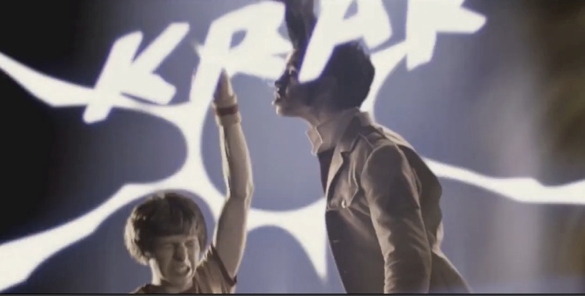
One of the things I really want to achieve with my stop motion clip is to give a sense of over-the-top-ness, with both expressions and actions speaking of the amazement at the technology. For the storyboard, I want to convey this through a possible usage of colour, value and line, in a grungy, comic book style. This image kind of captures the sense of speed and motion that could only really be captured in a video, an aesthetic I really want to mimic.


 Image acquired from: http://www.heyuguys.co.uk/images/2010/06/scott-pilgrim-tv-spot.jpg


The aesthetic I also want to consider capturing is using words and sketchy-style additions in the photographic storyboard to aid the comic book feel. This ideally will help convey the actions that I want to portray.

So at present, I'm looking to create a storyboard that is composed of photos as opposed to drawings. The elements of these photos will overlap other "frames" of the not-entirely-linear story progression. The photos will include elements of comic books such as dramatic line and tonal areas in the photos for effect. This will be punctuated with dialog as well, to convey the story.
The story seems to be more effectively portrayed with the use of black and white/grayscale,  with colours accenting certain points of interest or focus in the storyboard itself. The final stop-motion film clip will potentially be mimicking this. 

DSDN 101 Project 3: Preliminary Stop Motion Test

This is NOT the final look of The Clip. This is merely a test run to get a feel for stop motion and how it can be used effectively for what I want to do. It's also a test of the special effects I plan on using.


I really enjoyed making this clip. It presented multiple challenges, the most difficult and time-consuming of which was definitely the special effects. Photoshopping the clip photo by photo was no easy feat. For my storyboard for the actual final clip, I really want to capture the awe and amazement present in this kind of technology. I also really want to incorporate humour and more emotion. I haven't had much sleep this weekend, so the emotions present on my face were minimal at best.

For the main project, I plan on integrating far more future tech and enhancements on the AUG-REAL Specs as well.

Many thanks to Mark Lindsay for being the camera man! I shall employ you next time as well!
Check out his blog here: 
Mark Lindsay Portfolio

DSDN 101 Project 3: The Glasses

Today I spent all day making and planning for my brief part of my final stop motion video. Part of this process was to make the "Augmented Reality Glasses" for the clip. I constructed these out of wire, thread, and a small circular piece of plastic that I found. The design was rudimentary and functional. There really isn't a futuristic feel to them at all. In fact, I'd almost say that what I've created has a "Steampunk" feel to it, and the latch-style lens is a cool touch. 
The Aug-Real Specs!

The "ubiquitous" latch holographic lens!

Top notch quality craft!

Sunday, May 20, 2012

DSDN 101 Project 3: Project Ideas

After consolidating the brainstorming I had done to what Media Design means to me, I've decided that I really want to explore the idea of virtual worlds in combination with the real world. In that sense, what I really want to do is show where Media Design could be going in that particular field. We're starting to see this kind of augmented reality in futuristic prototypes and advertising such as the Google project, Project Glass.

Could interfaces such as this be the way of the future?
Acquired from: 
http://techpp.com/2012/04/06/i-dont-need-google-glasses/

However, I want to explore this concept as a separate entity. I want to see if it's possible to mimic technology such as holographic displays, holographic interfaces, and other methods of screenless display in a stop motion video. The kind of things I'd love to mimic are in films like Iron Man, Minority Report, Avatar, and in many video games too.


This technology looks absolutely fantastic and is now almost synonymous with the future in films and other videos. We see these UIs and automatically we are transported to the fantastical world of future technology. I believe Media Design is going to have a huge role to play in the development of these user interfaces. People will want interfaces that work for all of us individually.

Free-form interfaces would be even more awesome.
Acquired from: http://wn.com/Iron_Man_JARVIS_Effect

I think what I really want to create is something along the lines of Tony Stark's interface in the film Iron Man. I anticipate this will be far more difficult than previously anticipated though. I don't have the tools or the ability to create something 3-D, however, I believe I could possibly create something much more simple and 2-dimensional.

I think what I'll do is start with a glasses-style augmented reality and then work up to an actual standalone system.

DSDN 101 Project 3: Preliminary Brainstorming


Tuesday, May 15, 2012

DSDN 101 Group Task: Brainstorming

We were told to brainstorm what made our chosen field of design special, and what it exemplified. We looked at industrial design creating physical solutions to problems, and then came up with examples of design involved in iconic designs.