So, my game is complete! And it proved to be a lot of fun. Even though a horrible atrocity befell me three nights before the hand-in (I lost all my code due to my losing my hard drive), I managed to pull through with a little help from a stiff drink and some pumping tunes.
One of the simplest aspects of the game that I find the most compelling is the parallax effect that I generated for the various layers of the game. I wanted to give the game a much more interesting depth to it than is normally possible in a 2D game.
The entire experience was designed to be dynamic. The instructions fall away as you master the mechanics of the game, and the sun drifts down in the sky as you travel higher. Soon you grasp how quickly you're moving vertically as you hit the clouds though.
Most of the clouds are in the distance, while others are in between the viewer and where the game takes place, occasionally briefly obscuring the game, making things harder for the player. The clouds all move at different speeds, highlighting the sense of depth.
The game gets progressively harder, as the gravity constant begins to skew. It starts to make the ball fall faster, while the ball's rebound gets stronger, ensuring that the height the ball bounces stays constant.
I went for a very minimal aesthetic with the game, letting strong colours and shapes do the talking more than anything.
If there was one thing I wish I could have done to add to the game, it would have been to add a high score recorder, as the game actually got taken quite competitively in the in-class test. I loved this project, and I'm actually fairly disappointed that there isn't going to be a third-year coding class. Oh well, that's what free time is for, right?
Showing posts with label MDDN 242. Show all posts
Tuesday, November 5, 2013
MDDN 242: Sky Climber
Labels:
Hand-in,
MDDN 242,
Second Year
Friday, October 4, 2013
MDDN 242: Stellar Mountains
And now I have it! After experimenting with various options, I decided to take the path that allowed the users to influence the mountainous structure, but then have a visual display at the same time that would allow them to understand how they were influencing the curve. I made a blue line that pulses across from left to right, but that also still exists statically, that the user can move and manipulate and actually see how they are affecting it.
At the same time, this blue line is a feature piece that only exists when the mouse button is held down, embodying the idea of a temporary, ever-changing beauty, as when released, the line fades, making way for the web to again be the centrepiece. I really like how it's turned out, and the forms you can create with it look really beautiful. They remind me of nebulae and galaxies in space.
"Instructions:
Click and drag the mouse to influence the mountain-forming curve. Depending on how your mouse moves, the line changes in a particular way. Press the buttons to reset or clear. The interaction works best with a slow and heavy hand on the mouse movements, holding down the mouse for a long time and moving it around slowly.
With this project, I sought to create a dynamic, abstract form generator that could be influenced, rather than controlled, by the user. I wanted to create something with a very simple aesthetic, that both exemplified and hid the complex elements. I also wanted the user to have the ability to see how they were influencing the line, while at the same time still maintaining the pure web-like layering that makes the whole thing beautiful. The resultant piece I wanted to form like a mountain, or if the user pushes the code to the limit, look more like nebulae in space.
I meant this code as a generative piece, and I wanted to allow the user to save their "creations". The interesting aspect of the interaction as a whole is that every user starts out not knowing how it works, and by the end of the interaction, everyone has a certain way they like to manipulate the piece and a certain result they enjoy seeing."
Above are shown various forms that can be created with the program, and below is the link to the code that you can play with. Have a go! Make something pretty!
Stellar Mountains by Sebastien Voerman
At the same time, this blue line is a feature piece that only exists when the mouse button is held down, embodying the idea of a temporary, ever-changing beauty, as when released, the line fades, making way for the web to again be the centrepiece. I really like how it's turned out, and the forms you can create with it look really beautiful. They remind me of nebulae and galaxies in space.
"Instructions:
Click and drag the mouse to influence the mountain-forming curve. Depending on how your mouse moves, the line changes in a particular way. Press the buttons to reset or clear. The interaction works best with a slow and heavy hand on the mouse movements, holding down the mouse for a long time and moving it around slowly.
With this project, I sought to create a dynamic, abstract form generator that could be influenced, rather than controlled, by the user. I wanted to create something with a very simple aesthetic, that both exemplified and hid the complex elements. I also wanted the user to have the ability to see how they were influencing the line, while at the same time still maintaining the pure web-like layering that makes the whole thing beautiful. The resultant piece I wanted to form like a mountain, or if the user pushes the code to the limit, look more like nebulae in space.
I meant this code as a generative piece, and I wanted to allow the user to save their "creations". The interesting aspect of the interaction as a whole is that every user starts out not knowing how it works, and by the end of the interaction, everyone has a certain way they like to manipulate the piece and a certain result they enjoy seeing."
Above are shown various forms that can be created with the program, and below is the link to the code that you can play with. Have a go! Make something pretty!
Stellar Mountains by Sebastien Voerman
Labels:
Hand-in,
MDDN 242,
Second Year
Tuesday, October 1, 2013
MDDN 242: Adaptation Is The Best Remedy
So, the direction that I want to take this project now is more along the lines of wanting to allow the user to influence the structure and growth of the structure as a whole. I don't want the user to feel like they have complete control, but rather that they are having a tangible, not quite understood effect on the generation of the scape.
One idea that I've begun to play with, which I quite like, is the addition of random blue quads, which I think have the potential to enhance the form itself and give it more interesting elements of depth. Another part I built in here was a shaded layering effect, where I had the curve creating the mountain shifting as well as changing shade at the same time. It's a little bit too strong in this one, but the next one conveys it nicely.
Here the shift is a little bit slower and hence easier to see. The blue quads here made a really interesting form, but I toned them back a bit so that the web was still the star of the show. That's what I really put the work into, so I feel that would be more worthy to show off.
After experimenting with darker shades, I decided to switch to white, so that my forms could be very clear cut, as well as allowing the reference to the mountain to be more tangible. One important aspect that I built into this form was the use of a third curve. The first is responsible for creating the top-most form, and giving the mountain exterior structure. The second curve is responsible for filling out the mountain with very light, interspersed connection points and lines. The third and final curve that I built in creates highlight structures on the mountains, creating the illusion of valleys and a 3D nature.
This is the same code as before, but less chaotic and more controlled, as well as earlier in the cycle. I think the blue quads are starting to be more distracting rather than useful, so I think I'm going to edit the code. I have some really cool ideas for where to take the code now that I have the user input as the mouse. This input influences the curve in different ways depending on in which direction the user moves their mouse. I also plan on building in a GUI, so that the user can reset the generation, or alter the curve and have the generation restart with their custom curve. I also want the user to have the ability to save their frames, so that they can have something interesting come out as a saved file.
One idea that I've begun to play with, which I quite like, is the addition of random blue quads, which I think have the potential to enhance the form itself and give it more interesting elements of depth. Another part I built in here was a shaded layering effect, where I had the curve creating the mountain shifting as well as changing shade at the same time. It's a little bit too strong in this one, but the next one conveys it nicely.
Here the shift is a little bit slower and hence easier to see. The blue quads here made a really interesting form, but I toned them back a bit so that the web was still the star of the show. That's what I really put the work into, so I feel that would be more worthy to show off.
After experimenting with darker shades, I decided to switch to white, so that my forms could be very clear cut, as well as allowing the reference to the mountain to be more tangible. One important aspect that I built into this form was the use of a third curve. The first is responsible for creating the top-most form, and giving the mountain exterior structure. The second curve is responsible for filling out the mountain with very light, interspersed connection points and lines. The third and final curve that I built in creates highlight structures on the mountains, creating the illusion of valleys and a 3D nature.
This is the same code as before, but less chaotic and more controlled, as well as earlier in the cycle. I think the blue quads are starting to be more distracting rather than useful, so I think I'm going to edit the code. I have some really cool ideas for where to take the code now that I have the user input as the mouse. This input influences the curve in different ways depending on in which direction the user moves their mouse. I also plan on building in a GUI, so that the user can reset the generation, or alter the curve and have the generation restart with their custom curve. I also want the user to have the ability to save their frames, so that they can have something interesting come out as a saved file.
Labels:
MDDN 242,
Process,
Second Year
Tuesday, September 24, 2013
MDDN 242: Finding Likeness & Extrapolating
So, I think I've got my plan for where to progress with the next project. I want to take it in the direction of connective tissue or data visualisation. I really want to have the skill to be able to make this project actually visualise some form of data, but I think I'm going to have to end up leaving that part out of it all.
I really like this form of visualization, as it ends up looking like a mind map on steroids. I think that the most interesting part isn't necessarily the way that the data is visualized, but the patterns and forms and textures that evolve out of the myriad of connections made. This is what I want too expand on. I think that making connections like these ends up looking like constellations, but that I can sculpt this mess into something else as well.
The form that I decided I would make started with an idea from my precedents. I wanted to make extreme natural formations that would challenge people's eyes and create something familiar while displaying it in a foreign way. I think this has a lot of potential to be a very interesting visual stimulus.
As you can see here, the web-like structures layer up and create focal points, where the layering gives us a sense of depth and shading. I think I will try and redo this sketch with the web being a different shade. Perhaps as the web layered up, the form could shift in colour?
Image acquired from: http://www.digicult.it
I really like this form of visualization, as it ends up looking like a mind map on steroids. I think that the most interesting part isn't necessarily the way that the data is visualized, but the patterns and forms and textures that evolve out of the myriad of connections made. This is what I want too expand on. I think that making connections like these ends up looking like constellations, but that I can sculpt this mess into something else as well.
The form that I decided I would make started with an idea from my precedents. I wanted to make extreme natural formations that would challenge people's eyes and create something familiar while displaying it in a foreign way. I think this has a lot of potential to be a very interesting visual stimulus.
As you can see here, the web-like structures layer up and create focal points, where the layering gives us a sense of depth and shading. I think I will try and redo this sketch with the web being a different shade. Perhaps as the web layered up, the form could shift in colour?
Labels:
Inspiration,
MDDN 242,
Process,
Second Year
Saturday, September 21, 2013
MDDN 242: Hitting That Liftoff Button...
Some of the best inspiration I found follows. I think all of it is stunning, and this'll definitely help me suss my stuff out. So, what I think I've decided is that rather than painting, I want the whole thing to be much more of a case of "generative art", where the whole thing kind of runs itself after the very first input. I want it to have a very careful use of colour, and ultimately make something layered and beautiful. Perhaps the interaction could be quite minimal and let the user have a small element of control.
I love this one. The colours and the shapes definitely draw from a space photo, but I think something like this is definitely achievable. The use of colour in these sorts of this is of utmost importance. Any use of a random colour palette is artistic suicide, and it just ends up looking like someone vomited all over the scree and made it do something cool. And the vomit cancels out the coolness, trust me. I'm going to experiment with something like this one and see what sort of results I can get.
This one is another stunner. Again, stupendously good colour selection, along with brilliant area-differentiation so that the colours given to the form being made make the whole thing feel much more 3-dimensional, rather than just a flood of light and dark colours, making the whole piece feel flat. No, the way the brush(?) flows around the image in this one is done so well. The whole piece is made of edgy sections, while at the same time it's definitely made of some harsher edges.
This one isn't generative, it's just a photo, but I think it could serve as good inspiration for making something. I love the idea of using Nature as inspiration for something so unnatural. That concept just really gels with me nicely. Perhaps what I could do is have a landscape generated through basic shapes, or maybe just lines, or perhaps even just squares. I reckon that is perhaps a good strategy to roll with. I think maybe if I go with that, I could get a lot of interesting results, and then alter it and play around with it once I've got the spaceship lifting off.
Image acquired from: http://media-cache-ec0.pinimg.com/
Image acquired from: http://media-cache-ak0.pinimg.com/
Image acquired from: http://x.anf.nu/
This one is dark, but you should definitely check it out in full size. Do it. You won't regret it. The detail of the two main different hues interacting is total eye candy. This one is extremely abstract and just feels like a cloth simulation, but the shift from light to dark at the bottom makes all the difference. I still think it's lovely and wish I could get lines to move like that.
Sadly, all the pieces above I discovered as static images, so I actually have no idea if they move or not. But, if they did, I think they'd be beautiful. I definitely want mine to move and generate progressively as time moves on.
Image acquired from: http://www.flickr.com/photos/65805468@N08/7528369082/
Labels:
Inspiration,
MDDN 242,
Process,
Second Year
Friday, September 20, 2013
MDDN 242: Inspiration Transformed
So, after looking at some precedents for this project, I decided the best way to figure out what I could do for the project would be to start sketching out my potential forms. Taking heavily from the inspiration that I looked at in the last post, I want to create something that is fun to play with, something that creates something beautiful, and something that really engages the user, giving them an aspect of interaction rather than control.
The idea on the left draws from the Natzke Ribbons, but removing the static nature of the interaction. The idea there is that the form would be defined by you, but none of the ribbons would actually fully follow the path that you created, in stead each of them would kind of follow the path, but still definitely illustrate a unique and slightly erratic path.
The idea on the right looks more at creating connections between randomness. The idea is that the user would click across the screen, and each time the user clicked a point was created, and this point would then drift in a random direction, creating a connection with other points that it got close to. This would then result in an ever-changing web that grew as the user added more points.
This idea is a little more straightforward, as the user would paint and have a line appear, resulting in a simple aesthetic inspired by some of the more textural generative pieces I looked at previously. The result would be something that ideal has both texture and direction that the user could layer up. Perhaps the colour of the tangents and the lines could slowly shift, allowing the user to layer up the various colours too, creating a dynamic scape.
This is the idea that I like the most so far. It's a spin on the previous web idea, where the user would paint across the screen and the points would form and start moving in the direction the mouse was traveling when the point was created. The points would then create connections between each other when the mouse was released, and drift across the screen, making more and more connections as the thing progressed.
After talking to my tutors, some of whom loved the last idea, I then talked to the last tutor. She looked at it and then told me she "knew I was capable of so much more" and that I should take a step back and find some inspiration in Nature and perhaps plan a little less and let the writing of the code and discovery of what else it could do take me places. So, step back time.
The idea on the left draws from the Natzke Ribbons, but removing the static nature of the interaction. The idea there is that the form would be defined by you, but none of the ribbons would actually fully follow the path that you created, in stead each of them would kind of follow the path, but still definitely illustrate a unique and slightly erratic path.
The idea on the right looks more at creating connections between randomness. The idea is that the user would click across the screen, and each time the user clicked a point was created, and this point would then drift in a random direction, creating a connection with other points that it got close to. This would then result in an ever-changing web that grew as the user added more points.
This idea is a little more straightforward, as the user would paint and have a line appear, resulting in a simple aesthetic inspired by some of the more textural generative pieces I looked at previously. The result would be something that ideal has both texture and direction that the user could layer up. Perhaps the colour of the tangents and the lines could slowly shift, allowing the user to layer up the various colours too, creating a dynamic scape.
This is the idea that I like the most so far. It's a spin on the previous web idea, where the user would paint across the screen and the points would form and start moving in the direction the mouse was traveling when the point was created. The points would then create connections between each other when the mouse was released, and drift across the screen, making more and more connections as the thing progressed.
After talking to my tutors, some of whom loved the last idea, I then talked to the last tutor. She looked at it and then told me she "knew I was capable of so much more" and that I should take a step back and find some inspiration in Nature and perhaps plan a little less and let the writing of the code and discovery of what else it could do take me places. So, step back time.
Labels:
MDDN 242,
Process,
Second Year
Wednesday, September 18, 2013
MDDN 242: Looking Into The Future
So, last night I got my grade back for the previous project of this course, and I was really disappointed, so I've decided to get back on my epic mount and punch through the course and get something really stellar for the next project. The next project seems like it's going to be a lot of fun, and I have a lot to learn for and from it. I have a tendency to get riled up after a poor grade, so hopefully by working on my failures, I can use the energy in a positive way! That, and I also got a really good sleep last night and did yoga on Monday, so I'm full of good energy at the moment. And I love it.
So. One of the first things I need to establish is the kind of project that I think this is. It's all about interaction, and interacting through a mouse input or any other input really. I can have as little control or as much as I like. The project is all about a drawing machine, so I'll let your minds think about what that involves. For me, it involves a reasonably controllable interaction, resulting in something that the user can experience in a fun way and then have something pretty to look at when they're finished with it.
So, I decided to have a bit of a look around at some inspiration that I think would benefit my project. This first one is called Ink Trails, and I really love the way it looks and moves. The ink trails start at points behind the red bar and then trail out in a really interesting way. The edges of the ink trails just feel really realistic and move in a quite natural way. Perhaps I can splice some of the motion from this piece. Definitely go check it out to look at the motion.
This piece is called Node Texture and has such a brilliant aesthetic. I love the way the dots connect and the lines build up this crazy texture that stacks and stacks. This nodal connection style has been used in a few films as a small feature element, and I really love the way it draws connections between the different disconnected elements. The Art Of Flight used this aesthetic in a really subtle way that really made the intro for me. I really want to create a sense of connection between what the user does and what the drawing machine actually makes, visually.
This one has a very slow and gradual motion to it. It builds out of a central square, and feels like a slowed down version of something moving at an extremely rapid pace. The particles/lines radiate away in a very pleasing, tangential sort of way. Perhaps the way that is moves is driven on a radial element running around the edge of the square. Either way, definitely go check out the sketch. The motion is really nice and ambient.
I'm just going to go out and say I love this piece. The rapid motion of the ribbons is absolutely stunning. I don't know quite how they did it, but I know it must have something to do with beziers and creating a whole bunch of control points. The particle system that it has looks a bit complicated, so hopefully I can actually get something on par with it. It's absolutely beautiful, definitely check it out.
This cellular automata animation is really visually exciting. The colours used to illustrate the life and death cycles of the cells make for a really stunning moving visual display. One of the ideas that I took from this generative piece was the way that the forms grew out of the mouse-click-and-hold path. Perhaps I could make something that felt a little more natural and grew out of the shapes of your motion?
So. One of the first things I need to establish is the kind of project that I think this is. It's all about interaction, and interacting through a mouse input or any other input really. I can have as little control or as much as I like. The project is all about a drawing machine, so I'll let your minds think about what that involves. For me, it involves a reasonably controllable interaction, resulting in something that the user can experience in a fun way and then have something pretty to look at when they're finished with it.
Image captured from: http://abandonedart.org/?p=402
So, I decided to have a bit of a look around at some inspiration that I think would benefit my project. This first one is called Ink Trails, and I really love the way it looks and moves. The ink trails start at points behind the red bar and then trail out in a really interesting way. The edges of the ink trails just feel really realistic and move in a quite natural way. Perhaps I can splice some of the motion from this piece. Definitely go check it out to look at the motion.
Image captured from: http://abandonedart.org/?p=470
This piece is called Node Texture and has such a brilliant aesthetic. I love the way the dots connect and the lines build up this crazy texture that stacks and stacks. This nodal connection style has been used in a few films as a small feature element, and I really love the way it draws connections between the different disconnected elements. The Art Of Flight used this aesthetic in a really subtle way that really made the intro for me. I really want to create a sense of connection between what the user does and what the drawing machine actually makes, visually.
Image captured from: http://abandonedart.org/?p=504
This one has a very slow and gradual motion to it. It builds out of a central square, and feels like a slowed down version of something moving at an extremely rapid pace. The particles/lines radiate away in a very pleasing, tangential sort of way. Perhaps the way that is moves is driven on a radial element running around the edge of the square. Either way, definitely go check out the sketch. The motion is really nice and ambient.
Image captured from: http://abandonedart.org/?p=144
I'm just going to go out and say I love this piece. The rapid motion of the ribbons is absolutely stunning. I don't know quite how they did it, but I know it must have something to do with beziers and creating a whole bunch of control points. The particle system that it has looks a bit complicated, so hopefully I can actually get something on par with it. It's absolutely beautiful, definitely check it out.
Image captured from: http://www.openprocessing.org/sketch/18093
This cellular automata animation is really visually exciting. The colours used to illustrate the life and death cycles of the cells make for a really stunning moving visual display. One of the ideas that I took from this generative piece was the way that the forms grew out of the mouse-click-and-hold path. Perhaps I could make something that felt a little more natural and grew out of the shapes of your motion?
Labels:
Inspiration,
MDDN 242,
Process,
Second Year
Friday, August 23, 2013
MDDN 242: The ABC Project
So, I know I haven't done anything blog-wise for this class really, so I thought I'd do a final blog post for Project 2, just to give a total run down of my process. Initially we were given a letter to work with and then ideate on.
For the project, what we actually had to make was a letter than would be animated to be fully formed when the mouse was at the centre of the screen. The letter I was given was "J" (uppercase). My game for this course is "simple is best", and for this project, I really wanted to do something that was made up on many smaller parts.
Initially I looked at working with curving lines, but then I decided on something more linear. I decided that I could have a multitude of crosses make up my form. They would be scattered across the screen, and then come together to form my letter. My first challenge was to make the J actually something the computer program could actually recognise and work with. The computer doesn't actually know what a "J" is, so initially I had to make the J out of an array of points, that I would then have the Xs gravitate towards.
Making the array of Xs was slightly easier, as the location of all of them is randomly decided, rather than having to be specifically plotted. The Xs have 11 variables each, most of which are slightly randomly decided, ensuring that the wash of Xs isn't too linear. Another element that I got to play around with was the speed at which the Xs pulse. That's right, I got them to pulse. Cool or what? I got the Xs to pulse at different speeds as well as different interpolations. So they move at different rates at different times. That makes it much more interesting to look at.
Another aspect that I initially scrapped, but then re-considered was having something in the background going on at the same time. The reason I reconsidered it was because when the J was fully formed, the surrounding area on the canvas was and felt very empty. This was something I wanted to rectify, so I decided to have the background morph with the transition into the letter. I worked with extremely faded crosses for when the Xs are dispersed, while when the Xs come in to form the J, the background Xs would shift to a much darker and more imposing background that filled the surrounding space well.
Fortunately, after a bit of research, I found a way of getting my sketch online. Sadly I can't get it onto my blog without breaking it, but you can view it over at Open Processing. Check it out!
For the project, what we actually had to make was a letter than would be animated to be fully formed when the mouse was at the centre of the screen. The letter I was given was "J" (uppercase). My game for this course is "simple is best", and for this project, I really wanted to do something that was made up on many smaller parts.
Initially I looked at working with curving lines, but then I decided on something more linear. I decided that I could have a multitude of crosses make up my form. They would be scattered across the screen, and then come together to form my letter. My first challenge was to make the J actually something the computer program could actually recognise and work with. The computer doesn't actually know what a "J" is, so initially I had to make the J out of an array of points, that I would then have the Xs gravitate towards.
Making the array of Xs was slightly easier, as the location of all of them is randomly decided, rather than having to be specifically plotted. The Xs have 11 variables each, most of which are slightly randomly decided, ensuring that the wash of Xs isn't too linear. Another element that I got to play around with was the speed at which the Xs pulse. That's right, I got them to pulse. Cool or what? I got the Xs to pulse at different speeds as well as different interpolations. So they move at different rates at different times. That makes it much more interesting to look at.
Another aspect that I initially scrapped, but then re-considered was having something in the background going on at the same time. The reason I reconsidered it was because when the J was fully formed, the surrounding area on the canvas was and felt very empty. This was something I wanted to rectify, so I decided to have the background morph with the transition into the letter. I worked with extremely faded crosses for when the Xs are dispersed, while when the Xs come in to form the J, the background Xs would shift to a much darker and more imposing background that filled the surrounding space well.
One thing that I decided to change my mind on at the last minute was my colour scheme. Initially, I was working with a set of blue hues, but then I read the brief, where it stated that the colour scheme of the project should echo the Alphabet Book we initially looked at to start off the project. The colour scheme for that was red, black, and white, so I adjusted my work just a little bit to exemplify that.
Here is a little .gif for how the transition works, but it really doesn't show how the Xs all pulse. However, it does show the movements of the Xs from their initial points to their final locations, which is a big part of actually creating the letter.
Fortunately, after a bit of research, I found a way of getting my sketch online. Sadly I can't get it onto my blog without breaking it, but you can view it over at Open Processing. Check it out!
Labels:
Hand-in,
MDDN 242,
Process,
Second Year
Wednesday, July 17, 2013
MDDN 242: Creating Faces
So, the new project that I have to do for a totally different class this year, (MDDN 242, an actual Media paper!) involves designing a face that responds to a volume input and changes; or sings it, so to speak.
To start off the project, we first had to come up with a small legion of faces, and for that I drew a lot of influence from pop culture, as well as coming up with a lot of fresh material.
At first, I really wanted to make something quite complex, but eventually I decided I'd much rather do something simple with a good deal of abstraction. I started on the idea of a comical face, but this eventually led on to something a little more serious.
The first chap I went with as one of my final three was a very expressive emoticon-type of face, which would not enjoy the actual singing. I wanted it to really suffer when doing the singing, and express this in the way it was portrayed.
This face was definitely headed in the direction I wanted to go. Using minimal lines, and just some very basic forms, I could create an expression-full face. This one is a little bit more evil looking, and seems to be demonically enjoying the singing it's doing.
The final form my face took was in the form of a strange, rectilinear spiral form. I really liked this form that the face took, as it gives it both a minimalist and a busy aesthetic. Using only simple lines, I can actually get a fairly large amount of expression out of the face, and it should be perfect to sing the song that I have in mind.
The song that I have in mind is this, as it is a strong vocal rendition of the song, and being just the vocals, the face will react better and really look like it is singing the song. Plus, everyone knows the song so well that they don't need to hear the instruments to imagine them.
To start off the project, we first had to come up with a small legion of faces, and for that I drew a lot of influence from pop culture, as well as coming up with a lot of fresh material.
At first, I really wanted to make something quite complex, but eventually I decided I'd much rather do something simple with a good deal of abstraction. I started on the idea of a comical face, but this eventually led on to something a little more serious.
The first chap I went with as one of my final three was a very expressive emoticon-type of face, which would not enjoy the actual singing. I wanted it to really suffer when doing the singing, and express this in the way it was portrayed.
This face was definitely headed in the direction I wanted to go. Using minimal lines, and just some very basic forms, I could create an expression-full face. This one is a little bit more evil looking, and seems to be demonically enjoying the singing it's doing.
The final form my face took was in the form of a strange, rectilinear spiral form. I really liked this form that the face took, as it gives it both a minimalist and a busy aesthetic. Using only simple lines, I can actually get a fairly large amount of expression out of the face, and it should be perfect to sing the song that I have in mind.
The song that I have in mind is this, as it is a strong vocal rendition of the song, and being just the vocals, the face will react better and really look like it is singing the song. Plus, everyone knows the song so well that they don't need to hear the instruments to imagine them.
Labels:
Inspiration,
MDDN 242,
Process,
Second Year
Tuesday, July 16, 2013
MDDN 242: Inspirational Faces
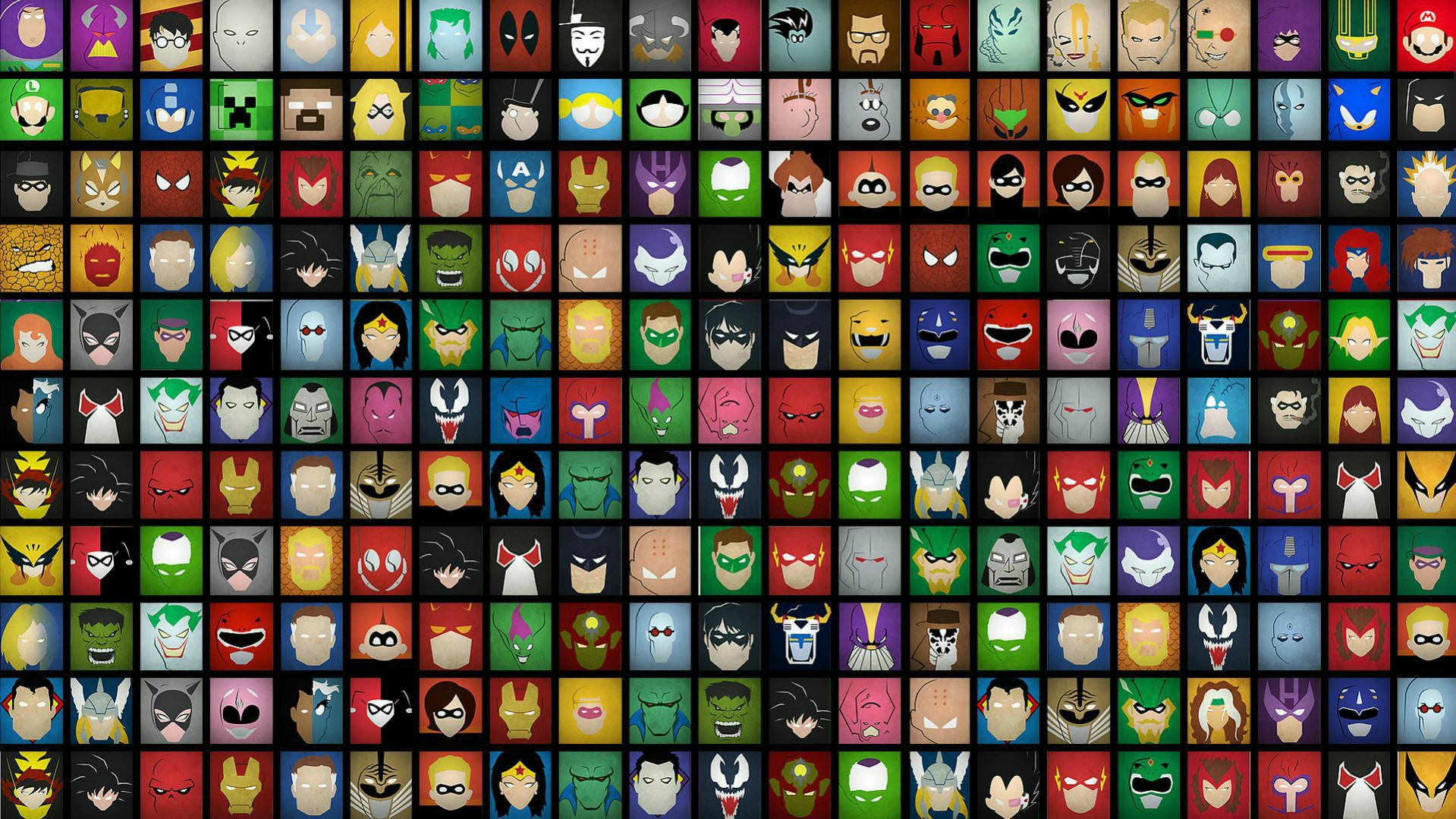
To get this project sussed, I really needed to scout around for forms that could serve as faces, as well as faces that could show me how to make different forms and then use those different forms. To start off, I began with an array of comic faces that had been simplified to make best use of a multitude of basic shapes.
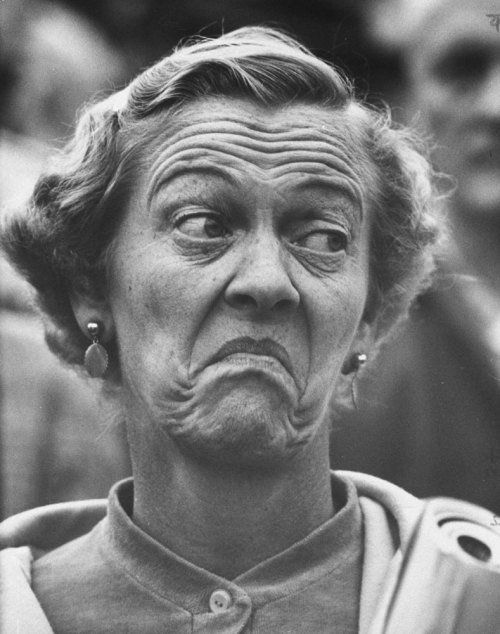
Thereafter, I began to look at real human faces, as the expressions visible in them is nearly endless. People have the most awesome capabilities to morph their faces into strange forms, often resulting in hilarious results. My sister often tells me that I have a very malleable face, and I love making stupid and funny faces, so looking at the faces of others for this project is a good place to start.
Image acquired from: http://img.myconfinedspace.com
Thereafter, I began to look at real human faces, as the expressions visible in them is nearly endless. People have the most awesome capabilities to morph their faces into strange forms, often resulting in hilarious results. My sister often tells me that I have a very malleable face, and I love making stupid and funny faces, so looking at the faces of others for this project is a good place to start.
Image acquired from: http://arthistory.about.com
Image acquired from: http://inmicio.tumblr.com
Image acquired from: http://dict.space.4goo.net
People have some beautifully expressive faces, I just need to figure out how to capture that in my coding.
Labels:
Inspiration,
MDDN 242,
Process,
Second Year
Subscribe to:
Posts (Atom)